Putting events on a timeline

Keep document dates, event dates, and uncertain durations apart

information visualization
timelines
temporal parsing
Learn how to draw a small event timeline without turning coarse or missing dates into false points.

The pilot lasted six weeks looks ready for a timeline until Nadia asks when the six weeks began. Other entries report a day, a month, or a season.

Events on a timeline means placing event records on a time scale only as precisely as the text allows. A day can be a point. A month, season, or course length needs an interval. A duration with no start date stays off the chart.

This lesson uses a small constructed log so the dates can be checked by eye. It builds on the temporal parsing lesson, which explains reference dates for phrases such as “next Friday.”

Note

The Riverton program log in this lesson is a constructed teaching example about an invented service desk; the entries and normalized dates were written by this lesson’s author.

TipWhat you will learn

This lesson shows how to:

  • keep the entry date separate from the event date;
  • resolve relative dates from each entry’s own date;
  • draw seasons, months, and course lengths as intervals;
  • mark planned and reported events without relying on color alone;
  • keep undated events in a table instead of guessing; and
  • compare narrative order with event order.

Build a small event log

An entry date is the date of the note. It is the anchor for relative language, not automatically the date of the event. The entry_id stays with every row so the timeline can be traced back to the source sentence.

library(dplyr)
library(ggplot2)
library(knitr)
library(purrr)
library(stringr)
library(tibble)
library(tidyr)

program_entries <- tribble(
  ~entry_id, ~entry_date, ~entry_text,
  "R01", "2026-02-20",
  "The spring outreach window will run this spring.",
  "R02", "2026-03-03",
  "The orientation was held on March 2, and registration closes on March 15.",
  "R03", "2026-08-28",
  "The 12-week course starts on September 14.",
  "R04", "2026-09-20",
  "The reminder says the applicant check-in happened last Monday.",
  "R05", "2026-10-05",
  "The pilot lasted six weeks.",
  "R06", "2026-10-10",
  "The October review meeting is planned for October 22.",
  "R07", "2026-11-01",
  "The November report covers work completed in September."
) |>
  mutate(entry_date = as.Date(entry_date))

kable(
  program_entries,
  col.names = c("Entry ID", "Entry date", "Constructed log entry"),
  caption = "Constructed Riverton program log entries",
  row.names = FALSE
)
Constructed Riverton program log entries
Entry ID Entry date Constructed log entry
R01 2026-02-20 The spring outreach window will run this spring.
R02 2026-03-03 The orientation was held on March 2, and registration closes on March 15.
R03 2026-08-28 The 12-week course starts on September 14.
R04 2026-09-20 The reminder says the applicant check-in happened last Monday.
R05 2026-10-05 The pilot lasted six weeks.
R06 2026-10-10 The October review meeting is planned for October 22.
R07 2026-11-01 The November report covers work completed in September.

The second entry has two events and two dates. The orientation belongs to March 2. The registration closing belongs to March 15. Reading only the nearest date would fail on many real sentences, so the attachment is recorded by hand here.

Normalize only what the text supports

The normalization table names the event trigger, the time expression, and the rule used to compute dates. The season rule is a local convention: this page uses Northern Hemisphere meteorological seasons, so spring runs from March 1 through May 31.

season_bounds <- tribble(
  ~season, ~start_month, ~start_day, ~end_month, ~end_day,
  "spring", 3L, 1L, 5L, 31L,
  "summer", 6L, 1L, 8L, 31L,
  "autumn", 9L, 1L, 11L, 30L,
  "winter", 12L, 1L, 2L, 28L
)

event_plan <- tribble(
  ~event_id, ~entry_id, ~trigger, ~time_text, ~granularity, ~status, ~rule,
  "EV01", "R01", "outreach window", "this spring", "season", "planned",
  "entry-year spring",
  "EV02", "R02", "orientation held", "March 2", "day", "reported",
  "entry-year month day",
  "EV03", "R02", "registration closes", "March 15", "day", "planned",
  "entry-year month day",
  "EV04", "R03", "12-week course", "September 14 for 12 weeks", "duration",
  "planned", "entry-year month day plus weeks",
  "EV05", "R04", "applicant check-in", "last Monday", "day", "reported",
  "previous weekday from entry date",
  "EV06", "R05", "pilot lasted", "six weeks", "duration", "reported",
  "duration without start",
  "EV07", "R06", "review meeting", "October 22", "day", "planned",
  "entry-year month day",
  "EV08", "R07", "September work", "September", "month", "reported",
  "entry-year month"
)

make_date <- function(year, month, day) {
  as.Date(sprintf("%04d-%02d-%02d", year, month, day))
}

parse_month_day <- function(entry_date, time_text) {
  parts <- str_match(time_text, "\\b([A-Z][a-z]+)\\s+(\\d{1,2})\\b")
  make_date(
    as.integer(format(entry_date, "%Y")),
    match(parts[, 2], month.name),
    as.integer(parts[, 3])
  )
}

parse_month_interval <- function(entry_date, time_text) {
  month_number <- match(time_text, month.name)
  start <- make_date(as.integer(format(entry_date, "%Y")), month_number, 1L)
  end <- seq(start, by = "1 month", length.out = 2L)[2] - 1L
  list(start = start, end = end)
}

previous_weekday <- function(entry_date, weekday) {
  weekday_names <- c(
    "Sunday", "Monday", "Tuesday", "Wednesday",
    "Thursday", "Friday", "Saturday"
  )
  current_day <- as.POSIXlt(entry_date)$wday + 1L
  target_day <- match(weekday, weekday_names)
  days_back <- (current_day - target_day) %% 7L
  if (days_back == 0L) {
    days_back <- 7L
  }
  entry_date - days_back
}

normalize_event <- function(rule, entry_date, time_text) {
  entry_year <- as.integer(format(entry_date, "%Y"))

  if (rule == "entry-year spring") {
    bounds <- season_bounds |>
      filter(season == "spring")
    return(list(
      start = make_date(entry_year, bounds$start_month, bounds$start_day),
      end = make_date(entry_year, bounds$end_month, bounds$end_day),
      placed = TRUE,
      reason_unplaced = NA_character_
    ))
  }

  if (rule == "entry-year month day") {
    start <- parse_month_day(entry_date, time_text)
    return(list(
      start = start,
      end = start,
      placed = TRUE,
      reason_unplaced = NA_character_
    ))
  }

  if (rule == "entry-year month day plus weeks") {
    start <- parse_month_day(entry_date, time_text)
    return(list(
      start = start,
      end = start + 12L * 7L - 1L,
      placed = TRUE,
      reason_unplaced = NA_character_
    ))
  }

  if (rule == "previous weekday from entry date") {
    start <- previous_weekday(entry_date, "Monday")
    return(list(
      start = start,
      end = start,
      placed = TRUE,
      reason_unplaced = NA_character_
    ))
  }

  if (rule == "entry-year month") {
    interval <- parse_month_interval(entry_date, time_text)
    return(list(
      start = interval$start,
      end = interval$end,
      placed = TRUE,
      reason_unplaced = NA_character_
    ))
  }

  list(
    start = as.Date(NA),
    end = as.Date(NA),
    placed = FALSE,
    reason_unplaced = "duration has no start date"
  )
}

event_rows <- event_plan |>
  left_join(program_entries, by = join_by(entry_id)) |>
  mutate(
    normalized = pmap(
      list(rule, entry_date, time_text),
      normalize_event
    ),
    start = as.Date(map_chr(normalized, \(item) as.character(item$start))),
    end = as.Date(map_chr(normalized, \(item) as.character(item$end))),
    placed = map_lgl(normalized, "placed"),
    reason_unplaced = map_chr(
      normalized,
      \(item) {
        if (is.na(item$reason_unplaced)) {
          NA_character_
        } else {
          item$reason_unplaced
        }
      }
    ),
    narrative_order = match(entry_id, program_entries$entry_id)
  ) |>
  select(
    event_id, entry_id, narrative_order, entry_date, trigger, time_text,
    granularity, status, rule, start, end, placed, reason_unplaced
  )

kable(
  event_rows,
  col.names = c(
    "Event ID", "Entry ID", "Narrative order", "Entry date", "Event trigger",
    "Time text", "Granularity", "Status", "Rule", "Start", "End", "Placed",
    "Reason unplaced"
  ),
  caption = "Normalized event records with separate document dates and event intervals",
  row.names = FALSE
)
Normalized event records with separate document dates and event intervals
Event ID Entry ID Narrative order Entry date Event trigger Time text Granularity Status Rule Start End Placed Reason unplaced
EV01 R01 1 2026-02-20 outreach window this spring season planned entry-year spring 2026-03-01 2026-05-31 TRUE NA
EV02 R02 2 2026-03-03 orientation held March 2 day reported entry-year month day 2026-03-02 2026-03-02 TRUE NA
EV03 R02 2 2026-03-03 registration closes March 15 day planned entry-year month day 2026-03-15 2026-03-15 TRUE NA
EV04 R03 3 2026-08-28 12-week course September 14 for 12 weeks duration planned entry-year month day plus weeks 2026-09-14 2026-12-06 TRUE NA
EV05 R04 4 2026-09-20 applicant check-in last Monday day reported previous weekday from entry date 2026-09-14 2026-09-14 TRUE NA
EV06 R05 5 2026-10-05 pilot lasted six weeks duration reported duration without start NA NA FALSE duration has no start date
EV07 R06 6 2026-10-10 review meeting October 22 day planned entry-year month day 2026-10-22 2026-10-22 TRUE NA
EV08 R07 7 2026-11-01 September work September month reported entry-year month 2026-09-01 2026-09-30 TRUE NA

Seven events receive dates. One duration does not. The start and end columns make the difference visible: a day has the same start and end. The spring and September bars mark only the season or month named in the entry; only the 12-week course bar is a known duration.

Keep unplaced events visible

Undated events should not disappear from the lesson. They also should not reach ggplot2, because missing dates would either create a warning or invite a false point.

unplaced_events <- event_rows |>
  filter(!placed) |>
  select(event_id, entry_id, entry_date, trigger, time_text, reason_unplaced)

kable(
  unplaced_events,
  col.names = c(
    "Event ID", "Entry ID", "Entry date", "Event trigger",
    "Time text", "Reason not drawn"
  ),
  caption = "Unplaced events kept out of the timeline",
  row.names = FALSE
)
Unplaced events kept out of the timeline
Event ID Entry ID Entry date Event trigger Time text Reason not drawn
EV06 R05 2026-10-05 pilot lasted six weeks duration has no start date

The “pilot lasted six weeks” row gives a length but no position. Nadia can keep it in the review table, but drawing it would be a guess.

Draw points only for days

The timeline below filters to placed events first. It uses segments for intervals and points for day-level dates. Shape and line type mark status, so the planned and reported distinction remains readable without color.

placed_events <- event_rows |>
  filter(placed) |>
  arrange(start, end, event_id) |>
  mutate(
    event_order = row_number(),
    y_position = -event_order,
    event_label = sprintf("%s. entry %s: %s", event_order, narrative_order, trigger)
  )

interval_events <- placed_events |>
  filter(granularity != "day")

day_events <- placed_events |>
  filter(granularity == "day")

ggplot() +
  geom_segment(
    data = interval_events,
    aes(
      x = start, xend = end,
      y = y_position, yend = y_position,
      linetype = status
    ),
    linewidth = 2,
    color = "grey35"
  ) +
  geom_point(
    data = day_events,
    aes(x = start, y = y_position, shape = status),
    size = 3,
    color = "black"
  ) +
  scale_linetype_manual(values = c(planned = "22", reported = "solid")) +
  scale_shape_manual(values = c(planned = 17, reported = 16)) +
  scale_x_date(
    date_breaks = "2 months",
    date_labels = "%b %Y",
    expand = expansion(mult = c(0.02, 0.04))
  ) +
  scale_y_continuous(
    breaks = placed_events$y_position,
    labels = placed_events$event_label
  ) +
  labs(
    x = "Event date or interval in 2026",
    y = "Chronological event order with source entry",
    shape = "Day-level status",
    linetype = "Interval status"
  ) +
  theme_minimal()
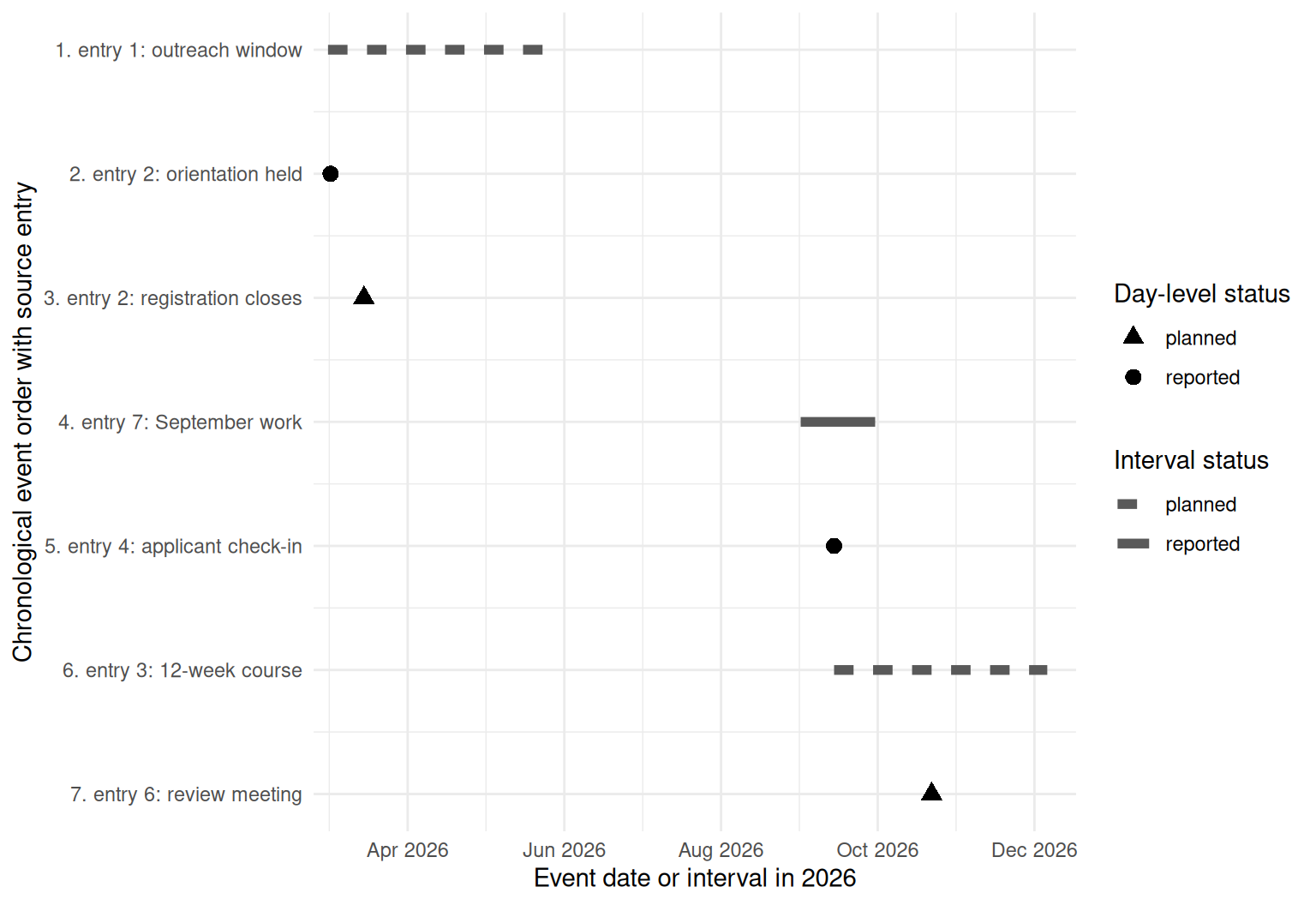
Timeline with seven placed events in chronological order. Three events are drawn as range bars: spring outreach can be placed only within March 1 to May 31 2026, September work can be placed only within September 1 to September 30 2026, and the 12-week course runs from September 14 to December 6 2026. Four day-level events are points on March 2, March 15, September 14, and October 22 2026. Each row label includes the event order and source entry number. The six-week pilot duration without a start date is left off the chart.
Figure 1: Timeline of seven placed events from a constructed Riverton log in 2026; range bars show a season, a named month, and one 12-week course duration, while four day-level events are points.

The y-axis is chronological event order, sorted by the resolved start date. Each row label also includes the source entry number, which shows narrative order. The November report is labeled entry 7, but its September work interval belongs before the October review meeting. That difference is why a timeline should not treat row order as time.

The event table is the long description for the figure. It gives the exact dates, status, and entry ID for each mark.

timeline_long_description <- placed_events |>
  transmute(
    event_order,
    narrative_order,
    event_id,
    entry_id,
    trigger,
    time_text,
    granularity,
    status,
    start,
    end
  )

kable(
  timeline_long_description,
  col.names = c(
    "Event order", "Narrative order", "Event ID", "Entry ID",
    "Event trigger", "Time text", "Granularity", "Status", "Start", "End"
  ),
  caption = "Text version of the timeline data",
  row.names = FALSE
)
Text version of the timeline data
Event order Narrative order Event ID Entry ID Event trigger Time text Granularity Status Start End
1 1 EV01 R01 outreach window this spring season planned 2026-03-01 2026-05-31
2 2 EV02 R02 orientation held March 2 day reported 2026-03-02 2026-03-02
3 2 EV03 R02 registration closes March 15 day planned 2026-03-15 2026-03-15
4 7 EV08 R07 September work September month reported 2026-09-01 2026-09-30
5 4 EV05 R04 applicant check-in last Monday day reported 2026-09-14 2026-09-14
6 3 EV04 R03 12-week course September 14 for 12 weeks duration planned 2026-09-14 2026-12-06
7 6 EV07 R06 review meeting October 22 day planned 2026-10-22 2026-10-22

How this differs from parsing one date

TimeML and related standards separate events, time expressions, and the document’s creation time. This page does the same thing in a small table. It does not train or evaluate a temporal parser, and the constructed normalizations are not independent labels.

A real-text coda shows why the table matters. In the inaugural corpus, Lincoln’s 1865 phrase “four years ago” can be anchored only to a speech year if the source records no month or day. The output should keep that year-level granularity rather than inventing a day.

What to remember

  • The entry date anchors relative phrases, but it is not the event date.
  • A season or month is an interval under a stated convention.
  • A day-level event can be a point; a coarse event should not be.
  • Planned events need a visible status cue.
  • A duration without a start date belongs in the unplaced table, not on the chart.

Nadia’s timeline is useful because it refuses one false mark. The six-week pilot is still visible, but it stays off the time scale until a start date appears.

Sources